From an ORCID record to a LaTeX publication list
A worked example on ORCID’s test record
Abstract
ORCID keeps the list of your works, and its public API returns it as JSON. That list is a good start for the publications section of an academic CV, but it is not a finished bibliography: the summaries carry no co-authors, the venue is often empty, and the same work can arrive from several sources. We read the record of Josiah Carberry (0000-0002-1825-0097), the fictitious researcher used in ORCID’s own documentation, and turned it into a LaTeX list two ways: plain LaTeX grouped by year, and biblatex fed with the BibTeX stored in ORCID.
1What the public API returns
Two read calls are enough (Figure 1). The first returns every work as a summary, grouped when several sources describe the same work. The second, given up to 100 put-codes, returns the full works. Both answered our requests without any token.
GET https://pub.orcid.org/v3.0/0000-0002-1825-0097/works
Accept: application/json

GET https://pub.orcid.org/v3.0/0000-0002-1825-0097/works/9543020,4562455,4562454
Accept: application/json
For this record the first call returned 6 groups holding 7 summaries: 1 work came from two sources. Table 1 lists the first summary of each group, the one a simple import keeps.
| Year | Title |
|---|---|
| 2012 | A Methodology for the Emulation of Architecture |
| 2012 | The Memory Bus Considered Harmful |
| 2011 | The Impact of Interactive Epistemologies on Cryptography |
| 2008 | Developing Thin Clients Using Amphibious Epistemologies |
| 2008 | Toward a Unified Theory of High-Energy Metaphysics: Silly String Theory |
| 1987 | Bulk and surface plasmons in artificially structured materials |
Table 1. The works of 0000-0002-1825-0097, as summaries. 6 of 6 have a DOI; 5 have no journal title.
{
  "put-code": 9543020,
  "title": {
    "title": {
      "value": "A Methodology for the Emulation of Architecture"
    },
    "subtitle": {
      "value": "Journal of Psychoceramics"
    },
    "translated-title": null
  },
  "type": "journal-article",
  "publication-date": {
    "year": {
      "value": "2012"
    }
  },
  "journal-title": null,
  "external-ids": {
    "external-id": [
      {
        "external-id-type": "issn",
        "external-id-value": "0264-3561"
      },
      {
        "external-id-type": "doi",
        "external-id-value": "10.5555/12345680"
      }
    ]
  }
}short-description, citation, contributors, language-code, country
contributors.2Limits to know before you import
- No co-authors in summaries. The summary has no
contributorsfield at all. The full works do, but on this record 1 of 6 listed any contributor. Expect to type author lists yourself. - Venue often missing. 5 of 6 summaries had an empty
journal-title, although the journal appears in the full work’s BibTeX. In the summary of Figure 2 the journal name sits intitle.subtitleinstead: “Journal of Psychoceramics”. - One work, several sources. A group can hold the same work from a publisher, a database and the researcher. Keep one per group, or you list the paper twice.
- Stored BibTeX is a snapshot. 6 of 6 full works carried a
citationin BibTeX. For DOI 10.5555/12345679, ORCID’s copy says 2008; the DOI resolver, asked for BibTeX the same day, said 2012 with the title “Developing Thin Clients Using Amphibious Epistemologies - edited title” (Figure 3). - Citation keys clash. The stored entries reuse keys:
Carberry_2008,Carberry_2012appear twice. Re-key before you feed them to BibTeX or biber.
@article{Carberry_2008,
  title={Developing Thin Clients Using Amphibious Epistemologies},
  volume={5},
  url={http://dx.doi.org/10.5555/12345679},
  DOI={10.5555/12345679},
  number={11},
  journal={Journal of Psychoceramics},
  publisher={CrossRef test user},
  author={Carberry, Josiah},
  year={2008},
  month={Feb},
pages={1-3}}doi.org, Accept: application/x-bibtex@article{Carberry_2012,
title={Developing Thin Clients Using Amphibious Epistemologies - edited title},
volume={1},
ISSN={0264-3561},
url={http://dx.doi.org/10.5555/12345679},
DOI={10.5555/12345679},
number={1},
journal={Journal of Psychoceramics},
publisher={Test accounts},
author={Carberry, Josiah},
year={2012},
month=Jan }When you need current metadata, resolve the DOIs again: the DOI to BibTeX tool does it for a list of DOIs.
3Plain LaTeX, grouped by year
The simplest list needs no bibliography software. Sort the summaries newest first, open one enumerate per year and link each DOI (Figure 4). It uses only what the summaries hold, so the authors are missing until you add them.
\section*{Publications}
\subsection*{2012}
\begin{enumerate}
  \item \textit{A Methodology for the Emulation of Architecture}.\newline
    DOI~\href{https://doi.org/10.5555/12345680}{\nolinkurl{10.5555/12345680}}
  \item \textit{The Memory Bus Considered Harmful}.\newline
    DOI~\href{https://doi.org/10.5555/666655554444}{\nolinkurl{10.5555/666655554444}}
\end{enumerate}
\subsection*{2011}
\begin{enumerate}
  \item \textit{The Impact of Interactive Epistemologies on Cryptography}.\newline
    DOI~\href{https://doi.org/10.5555/987654321}{\nolinkurl{10.5555/987654321}}
\end{enumerate}
\subsection*{2008}
\begin{enumerate}
  \item \textit{Developing Thin Clients Using Amphibious Epistemologies}.\newline
    DOI~\href{https://doi.org/10.5555/12345679}{\nolinkurl{10.5555/12345679}}
  \item \textit{Toward a Unified Theory of High-Energy Metaphysics: Silly String Theory}.\newline
    DOI~\href{https://doi.org/10.5555/12345678}{\nolinkurl{10.5555/12345678}}
\end{enumerate}
\subsection*{1987}
\begin{enumerate}
  \item \textit{Bulk and surface plasmons in artificially structured materials}.
    IEEE Transactions on Plasma Science.\newline
    DOI~\href{https://doi.org/10.1109/TPS.1987.4316723}{\nolinkurl{10.1109/TPS.1987.4316723}}
\end{enumerate}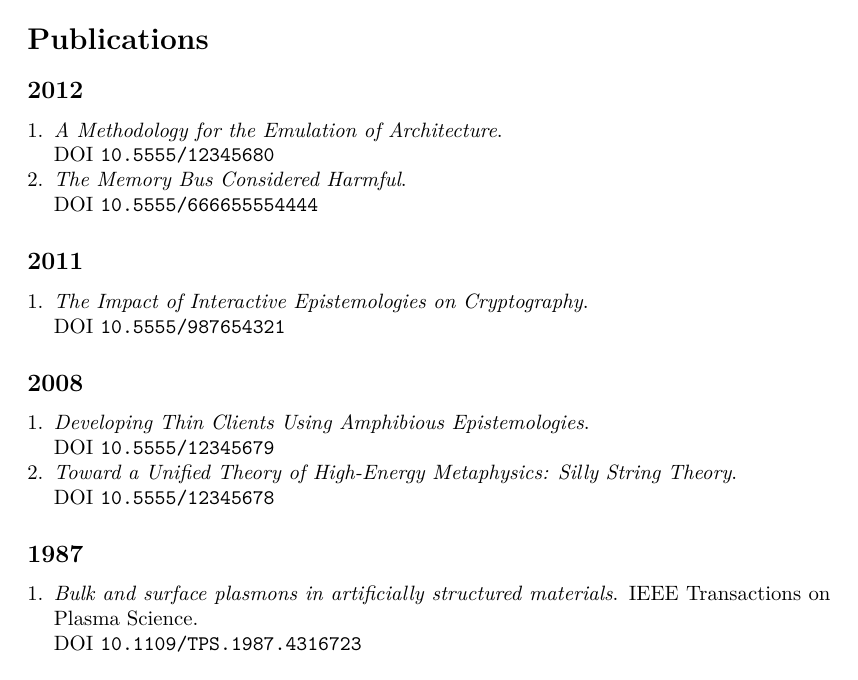
enumitem, xurl and hyperref.To group by type instead, use the type field: ORCID calls journal papers journal-article, conference papers conference-paper and preprints preprint. On this record every work is journal-article, so a grouping by type gives a single group, which is why Figure 4 groups by year.
4The biblatex route
If you already manage references with biblatex, take the BibTeX that ORCID stores with each full work, give each entry a unique key (here orcid plus the put-code) and print the list with sorting=ydnt, newest first (Figure 5). Splitting by type is one \printbibliography[type=...] per section.
\usepackage[style=authoryear, sorting=ydnt, maxbibnames=99,
            uniquename=false, uniquelist=false, url=false]{biblatex}
\addbibresource{orcid.bib}
\begin{document}
\nocite{*}
\printbibliography[type=article, title={Journal articles}]orcid.bib, last two entries@article{orcid9543020,
title={A Methodology for the Emulation of Architecture},
volume={5},
url={http://dx.doi.org/10.5555/12345680},
DOI={10.5555/12345680},
number={11},
journal={Journal of Psychoceramics},
publisher={CrossRef test user},
author={Carberry, Josiah},
year={2012},
month={Feb},
pages={1-3}}
@article{orcid19980729,
title = {Bulk and surface plasmons in artificially structured materials},
journal = {IEEE Transactions on Plasma Science},
year = {1987},
volume = {15},
number = {4},
pages = {394-410},
author = {Quinn, J.J. and Carberry, J.S.}}
Figure 5 also shows the cost of importing without review: five entries name the author “Carberry, Josiah”, the sixth “Carberry, J.S.”. To biblatex these are two different people, which breaks anything that matches names, such as setting your own name in bold. Normalise your name across entries before you print.
5With the latexci CV builder
The CV builder does the first route for you. Type your ORCID iD and press the import button: only the iD is sent, through a latexci endpoint, to pub.orcid.org. For up to 100 works it keeps the first summary of each group and fills the title, journal, year, DOI and type (journal article, conference paper or preprint), newest first, and skips titles already in your list. Co-authors are left for you to add, for the reason in Section 2; the builder then sets your own name in bold in every author list.
Applying outside academia too? Read whether a LaTeX resume is ATS-friendly, or, in French, Modèle de CV LaTeX gratuit.