Is a LaTeX resume ATS‑friendly?
What a text extractor reads from 15 test PDFs
Abstract
An applicant tracking system can only parse the text it gets out of your PDF. We did not test any commercial ATS. We compiled 15 small resume documents with pdfLaTeX, each pair differing in one detail, and read them with two open-source extractors. A LaTeX resume extracts cleanly when it uses the T1 font encoding, a single column, plain-text labels and dates written on the title line. Accents in the default encoding, icon fonts and dates set in their own column produced broken or misplaced text in at least one extractor.
1Method
Every document was compiled by the YToTech service, the one latexci uses for PDF export, then read by the tools in Table 1. pdftotext ran in two modes: its default reading order and -layout, which keeps the physical position of the text. Different parsers make different choices, so a resume is only safe when all three outputs make sense.
| Step | Tool and version |
|---|---|
| Compile | pdfTeX 1.40.29, TeX Live 2026, LaTeX 2025-11-01 |
| Extractor 1 | poppler pdftotext 26.07.0, default and -layout modes |
| Extractor 2 | pypdf 6.14.2, extract_text() |
Table 1. The test bench. The scripts are in the latexci repository under scripts/seo-cv/.
Remark. These are two extractors among many. The point is not to predict one product but to see which LaTeX constructs give unstable text, the raw material every parser starts from.
2Accents, ligatures and glyphtounicode
The usual advice is to add \input{glyphtounicode}\pdfgentounicode=1 so that ligatures such as fi extract as two letters. We crossed that line with the font encoding, on the text of Figure 1.
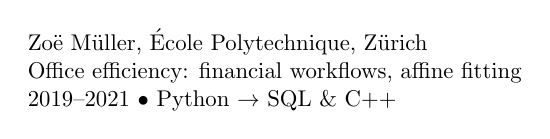
Zoë Müller, École Polytechnique, Zürich\par
Office efficiency: financial workflows, affine fitting\par
2019--2021 \textbullet\ Python $\to$ SQL \& C++\par
| Encoding | glyphtounicode line | ü in pdftotext | ü in pypdf |
|---|---|---|---|
| OT1 | no | u + U+0308 | U+00A8 + space |
| OT1 | yes | u + U+0308 | U+00A8 + space |
| T1 | no | U+00FC | U+00FC |
| T1 | yes | U+00FC | U+00FC |
Table 2. Font encoding (OT1 is LaTeX’s default; T1 here with lmodern) against the glyphtounicode line. ToUnicode: fonts carrying a Unicode map. U+0308 is a combining diaeresis, U+00A8 a spacing one, U+00FC the letter ü. “Letters”: both extractors returned efficiency, financial and affine as plain words.
Two results stand out. First, the encoding matters and the glyphtounicode line did not. With the default OT1 encoding, LaTeX builds ü from a u and a separate accent, and that is what comes out: pypdf returned the first line as
Zo¨ e M¨ uller,´Ecole Polytechnique, Z¨ urich
and pdftotext returned a u followed by a combining diaeresis, which a search for the precomposed ü does not match unless the software normalises Unicode. With \usepackage[T1]{fontenc} each accented letter is one glyph and both tools returned it as one character. Second, the ligatures were fine everywhere: on this installation the format already sets \pdfgentounicode to 1 (we printed its value), and every font of every test PDF carried a ToUnicode map with or without the line. Keep the line anyway: it costs nothing and makes the setting explicit for anyone who compiles your source on an installation that does not set it.
3Two columns against one
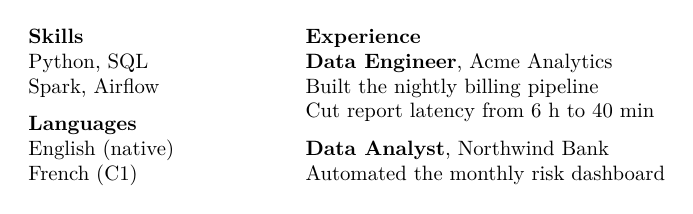
Figure 2 is the classic resume sidebar: skills and languages on the left, experience on the right. We built it twice, with two minipage boxes and with the paracol package. Both PDFs gave exactly the same text in all three readings, so only one is shown.
\begin{minipage}[t]{0.3\linewidth}
  \textbf{Skills}\par
  Python, SQL\par
  Spark, Airflow\par
  \medskip
  \textbf{Languages}\par
  English (native)\par
  French (C1)
\end{minipage}\hfill
\begin{minipage}[t]{0.66\linewidth}
  \textbf{Experience}\par
  \textbf{Data Engineer}, Acme Analytics\par
  Built the nightly billing pipeline\par
  Cut report latency from 6 h to 40 min\par
  \medskip
  \textbf{Data Analyst}, Northwind Bank\par
  Automated the monthly risk dashboard
\end{minipage}\columnratio{0.3}
\begin{paracol}{2}
\textbf{Skills}\par
Python, SQL\par
Spark, Airflow\par
\medskip
\textbf{Languages}\par
English (native)\par
French (C1)
\switchcolumn
\textbf{Experience}\par
\textbf{Data Engineer}, Acme Analytics\par
Built the nightly billing pipeline\par
Cut report latency from 6 h to 40 min\par
\medskip
\textbf{Data Analyst}, Northwind Bank\par
Automated the monthly risk dashboard
\end{paracol}Skills Python, SQL Spark, Airflow Languages English (native) French (C1) Experience Data Engineer, Acme Analytics Built the nightly billing pipeline Cut report latency from 6 h to 40 min Data Analyst, Northwind Bank Automated the monthly risk dashboard
Skills
Python, SQL
Spark, Airflow
Languages
English (native)
French (C1)

Experience
Data Engineer, Acme Analytics
Built the nightly billing pipeline
Cut report latency from 6 h to 40 min
Data Analyst, Northwind Bank
Automated the monthly risk dashboard
-layoutSkills Experience
Python, SQL Data Engineer, Acme Analytics
Spark, Airflow Built the nightly billing pipeline
Cut report latency from 6 h to 40 min
Languages
English (native) Data Analyst, Northwind Bank
French (C1) Automated the monthly risk dashboardThe reading-order extractors kept each column as a block, so the sidebar came first and the experience second. Layout mode did what its name says: the line “Skills” and the line “Experience” became one line, and “Python, SQL” now sits in front of a job title. A parser that reads line by line sees a skill list fused with your work history. The single flow in Figure 3 holds the same words and gave identical text in both pdftotext modes.
\textbf{Experience}\par
\textbf{Data Engineer}, Acme Analytics\par
Built the nightly billing pipeline\par
Cut report latency from 6 h to 40 min\par
\textbf{Data Analyst}, Northwind Bank\par
Automated the monthly risk dashboard\par
\medskip
\textbf{Skills}\quad Python, SQL, Spark, Airflow\par
\textbf{Languages}\quad English (native), French (C1)Experience Data Engineer, Acme Analytics Built the nightly billing pipeline Cut report latency from 6 h to 40 min Data Analyst, Northwind Bank Automated the monthly risk dashboard Skills Python, SQL, Spark, Airflow Languages English (native), French (C1)
Experience
Data Engineer, Acme Analytics
Built the nightly billing pipeline
Cut report latency from 6 h to 40 min
Data Analyst, Northwind Bank
Automated the monthly risk dashboard
SkillsPython, SQL, Spark, Airflow
LanguagesEnglish (native), French (C1)
\pdfinterwordspaceon in the preambleExperience Data Engineer, Acme Analytics Built the nightly billing pipeline Cut report latency from 6 h to 40 min Data Analyst, Northwind Bank Automated the monthly risk dashboard Skills Python, SQL, Spark, Airflow Languages English (native), French (C1)
pdfTeX does not write space characters: it moves the next word to the right, and the extractor has to guess that the gap is a space. pypdf did not guess across the \quad after a bold label. The pdfTeX primitive \pdfinterwordspaceon writes real spaces, and with it the words separated (Figure 3, last cell).
4Icons against labels
Icon fonts such as fontawesome5 draw an envelope or a phone with a glyph that has no letter behind it. Figure 4 shows what the extractors made of four icons, next to the same line with words.

\faEnvelope\ jane.doe@example.com \quad
\faPhone\ +33 6 12 34 56 78 \quad
\faLinkedin\ in/janedoe \quad
\faGithub\ janedoe
Email: jane.doe@example.com \quad
Phone: +33 6 12 34 56 78 \quad
LinkedIn: in/janedoe \quad
GitHub: janedoe
# jane.doe@example.com

[U+0083] +33 6 12 34 56 78

ï in/janedoe

§ janedoeEmail: jane.doe@example.com GitHub: janedoe Phone: +33 6 12 34 56 78 LinkedIn: in/janedoe
/envel⌢pejane.doe@example.com♂phone+33 6 12 34 56 78/linkedinin/janedoe/githubjanedoe
Email: jane.doe@example.com Phone: +33 6 12 34 56 78 LinkedIn: in/janedoe
GitHub: janedoe
The labels survived, but notice the order in the pdftotext cell: the wide \quad gaps made it read the wrapped line as columns, so “GitHub” came second. A visible separator avoids that; the latexci builder puts a vertical bar between contact items, and its contact lines came out in order (Figure 6).
5Where to put the dates
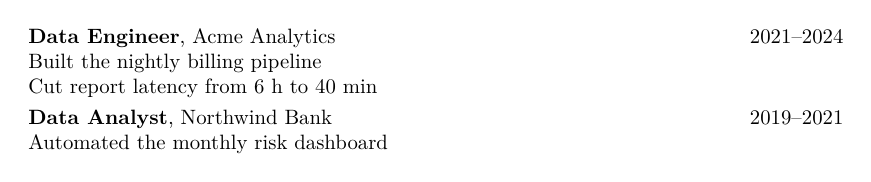
Many templates give dates their own column. We set two jobs five ways and checked, in each reading, whether each date stayed on its job title’s line or alone on the line next to it (Table 3).
| Layout | pdftotext | -layout | pypdf |
|---|---|---|---|
Date column, tabular | kept | kept | kept, glued to the title |
Same, with \pdfinterwordspaceon | kept | kept | kept |
Date column, two minipage | separated | separated | separated |
Title line, date pushed right with \hfill | separated | kept | kept |
| Title line, date after a comma | kept | kept | kept |
Table 3. Does each date stay with its job? Computed from the extracted text of each PDF.
\hfill\textbf{Data Engineer}, Acme Analytics \hfill 2021--2024\par
Built the nightly billing pipeline\par
Cut report latency from 6 h to 40 min\par
\smallskip
\textbf{Data Analyst}, Northwind Bank \hfill 2019--2021\par
Automated the monthly risk dashboardminipage column\begin{minipage}[t]{2.4cm}
2021--2024\par\vspace{3\baselineskip}
2019--2021
\end{minipage}%
\begin{minipage}[t]{10.6cm}
\textbf{Data Engineer}, Acme Analytics\par
Built the nightly billing pipeline\par
Cut report latency from 6 h to 40 min\par
\textbf{Data Analyst}, Northwind Bank\par
Automated the monthly risk dashboard
\end{minipage}\hfillData Engineer, Acme Analytics Built the nightly billing pipeline Cut report latency from 6 h to 40 min 2021–2024 Data Analyst, Northwind Bank Automated the monthly risk dashboard 2019–2021
minipage column2021–2024 2019–2021 Data Engineer, Acme Analytics Built the nightly billing pipeline Cut report latency from 6 h to 40 min Data Analyst, Northwind Bank Automated the monthly risk dashboard
Two layouts kept every date in place in all three readings: the date written on the title line after a comma, and a tabular date column once \pdfinterwordspaceon stopped pypdf from gluing the date to the job title. Dates in a separate minipage were lost in every reading. A date flushed right with \hfill depends on what follows it, as the next section shows.
6The latexci builder’s output
The CV builder uses T1, lmodern, the glyphtounicode line, hyperref metadata, one column and plain-text contact labels. Its dates are pushed right with \hfill but set smaller and followed by the employer line. We compiled its English example in the industry layout; Figure 6 is the start of the pdftotext output.
Dr Jane Smith
Postdoctoral Researcher, Computational Neuroscience
j.smith@university.edu | +44 20 0000 0000 | Oxford, UK
janesmith.github.io | github.com/janesmith | ORCID 0000-0002-1825-0097

Profile
Computational modelling of neural circuits, Bayesian inference in sensory processing and machine learning for neuroimaging.

Skills
Programming: Python, PyTorch, JAX, R
Tools: Git, LaTeX, Slurm, Docker
Languages: English (native), French (B2)

Experience
Postdoctoral Research Fellow

Oct. 2023 – present

University of Oxford • Oxford, UK

• Built a Bayesian decoder that cut analysis time for 7T fMRI data by 40%
• Leads a team of 3 PhD students and 2 master’s interns
pypdf is less kind to it. It split a word at a kerned capital in the industry layout and, in the academic layout, glued the date to the title (Figure 7).
Postdoctoral Research F ellow Oct. 2023 – present
Ph.D. in Computational NeuroscienceOct. 2019 – Sept. 2023
We report it as found: no extractor is perfect, which is why the checklist ends with reading your own PDF.
7Checklist
Each item points to the experiment behind it.
- Use the T1 encoding.
\usepackage[T1]{fontenc}withlmodernmade accented letters single characters (Table 2). - Keep the glyphtounicode line. It changed nothing on TeX Live 2026, but it costs nothing and covers other installations (Section 2).
- One column. Sidebars were merged with the main column in layout mode (Figure 2).
- Dates on the title line. Inline dates stayed in place in every reading; a date column in its own box did not (Table 3).
- Words, not icons. Write “Email:” or nothing; separate contact items with a bar, not wide spaces (Figure 4).
- Fill the PDF metadata. hyperref writes a title and an author into the file (Figure 8).
- Read your own PDF. Run
pdftotextin both modes and read the result from top to bottom (Figure 9).
\usepackage[T1]{fontenc}
\usepackage{lmodern}
\input{glyphtounicode}\pdfgentounicode=1
\usepackage[hidelinks,pdfusetitle]{hyperref}
\hypersetup{pdftitle={Jane Doe, CV}, pdfauthor={Jane Doe}, pdflang={en}}
pdfinfo on the resultTitle: Jane Doe, CV Author: Jane Doe Creator: LaTeX with hyperref Producer: pdfTeX-1.40.29
pdftotext cv.pdf -          # reading order
pdftotext -layout cv.pdf -  # physical layout
8Build one that passes
The LaTeX resume and CV builder applies items 1 to 6 for you, in English or French, with an academic or a one-page industry layout. Researchers can fill the publication list from ORCID: see ORCID to a LaTeX publication list. French speakers will find the French conventions in Modèle de CV LaTeX gratuit.
Appendix A Limits of this test
Two extractors, one TeX distribution and short documents. A commercial parser may normalise Unicode, merge lines or use optical character recognition; we cannot see inside one. What the test does show is which LaTeX constructs produce text that depends on the reader, and those are the ones worth avoiding. Every source on this page compiled on the date above; the PDFs, the extracted text and the scripts can be regenerated with node scripts/seo-cv/run-ats.mjs.